QuickBooks Pro vs. Premier: Differences and Your Options
Written by InvoiceBerry Team on September 29, 2026
Choosing accounting software for a small business starts with everyday work: sending invoices, tracking bills and giving the right people access to the books. If you use QuickBooks Desktop, understanding the difference between Pro and Premier can help you decide whether your current setup still fits.
The main difference between QuickBooks Pro and Premier is that Premier supports more simultaneous users and adds industry-specific tools, sales orders and inventory assemblies. Pro covers the core accounting tasks many small businesses need. Both are QuickBooks Desktop products; neither is a QuickBooks Online plan.
Try our online invoicing software for free
Accept online payments with ease
Keep track of who's paid you
Start sending invoices
For US businesses, availability now changes the decision. Intuit stopped selling new subscriptions to Desktop Pro Plus and Premier Plus after Sep 30, 2024. Existing subscribers can still renew under Intuit’s current terms. If you are starting from scratch, an old Pro-versus-Premier price comparison is not a reliable shopping guide. These rules are set out in Intuit’s US subscription policy.
This guide covers the US editions and was checked on Sep 28, 2026. It will help you understand what your existing edition does, whether you need more functionality, and which options to evaluate next.
QuickBooks Pro and Premier at a glance
What matters |
QuickBooks Pro |
QuickBooks Premier |
|---|---|---|
Simultaneous users in one company file |
Up to 3 with appropriate licenses |
Up to 5 with appropriate licenses |
Core accounting |
Invoicing, bills, bank reconciliation and financial reporting |
Core Pro functionality plus additional tools |
Industry-specific editions |
General-purpose edition |
Industry editions including contractor, manufacturing and wholesale, nonprofit, retail and professional services |
Sales orders |
Not available |
Available |
Inventory assemblies |
Not available |
Available |
Reporting |
General business reports |
Additional industry-focused reporting |
New US Plus subscriptions |
No longer sold |
No longer sold |
Existing Plus subscriptions |
Renewal remains available under current terms |
Renewal remains available under current terms |
The user limits describe concurrent access, not the number of customers you can invoice. They also do not mean a single-user subscription automatically includes three or five seats. Check your own license entitlement before adding staff.
The differences that change everyday work
More people can work at the same time
Pro supports up to three simultaneous users; Premier supports up to five, as Intuit’s Desktop training manual explains. That difference matters when the owner, bookkeeper and another team member are already using the company file and a fourth person needs access.
Count the people who actually need access at overlapping times. A business with six employees may only need one accounting user, while a smaller team may need four. If you need more than five concurrent users, the Pro-versus-Premier comparison will not resolve that requirement.
Premier adds industry-specific reporting
Premier’s industry editions organize some workflows and reports around different kinds of business. For example, a contractor needs to examine work by job, while a nonprofit may need reporting around programs and funding. Pro uses a more general setup.
Ask your bookkeeper which specific report is missing. “We need to review costs to complete each job” is a useful requirement. “We probably need the more advanced version” is much harder to evaluate. Both editions can track business activity; the value of Premier depends on whether its additional tools reduce work you currently do elsewhere.
Do not assume that Pro has no inventory or job-costing functionality. The Desktop training manual documents both in Pro, then lists Premier’s additional capabilities. The distinction is the workflow you need, rather than a simple accounting-versus-no-accounting split.
Sales orders help separate an order from an invoice
A sales order records a customer order you expect to fulfill later. That is useful when the order arrives before the goods are ready to ship. Intuit documents sales orders for Desktop Premier and Enterprise, but not Pro.
Consider a small wholesaler that accepts an order for 20 items and ships it in two batches. Before changing software, map how the team records the order, tracks what remains to ship and creates the invoice. Premier’s sales-order workflow may be relevant to an existing subscriber with that problem. A consultant who invoices after completing a project may have little use for it.
An estimate, a sales order and an invoice serve different purposes. An estimate proposes work or a price; a sales order tracks an accepted order for future fulfillment; an invoice requests payment. Choose software around the documents your business actually uses. Our guide to common types of invoices can help you identify any additional billing documents you need.
Assemblies matter when you build a product from components
Premier adds inventory assemblies to the basic inventory functionality shared by the editions. For a business that combines components into a finished item, the distinction can matter more than the number of available reports.
For example, a business selling assembled gift sets needs a reliable way to account for the components used in each set. Before switching systems, test a representative item and check how quantities and costs behave. Selling finished items without assembly creates a different requirement. More complex stock operations, such as tracking inventory across locations, deserve a separate evaluation of advanced inventory software or the appropriate Enterprise plan.
Pro Plus and Premier Plus are subscriptions
“Pro” and “Premier” identify the edition. “Plus” identifies the subscription offering. Older articles, secondhand listings and software installed years ago may use the names inconsistently.
Write down the exact product name, platform year, release and subscription status before comparing options. A legacy standalone copy and an active Plus subscription do not have the same licensing and support situation. Do not assume that being able to open an old company file means every connected service is supported.
Intuit’s release-process guidance explains that Desktop Plus 2024 and Enterprise 24.0 were its last annual platform releases. It has moved to continuous product and security updates for current subscribers. A “2024” platform label therefore does not, by itself, show that the product has been abandoned.
Are Pro and Premier still supported?
The end of new US sales and the end of support for an older version are separate events. Intuit’s current policy allows existing Pro Plus and Premier Plus subscribers to renew and receive updates and support under the subscription terms.
Version support still matters. Intuit’s service-discontinuation policy says support for Desktop 2023 ended after May 31, 2026. Affected services include bank downloads and other connected features. Its guidance directs eligible existing subscribers to the 2024 platform. Check the current service-discontinuation notice against the exact version you use.
Do not choose a migration date from an old comparison article that simply adds three years to a platform name. Check Intuit’s current notice and your account first. Equally, do not interpret renewal availability as a promise that pricing, features or support terms will remain unchanged indefinitely.
What should you do next?
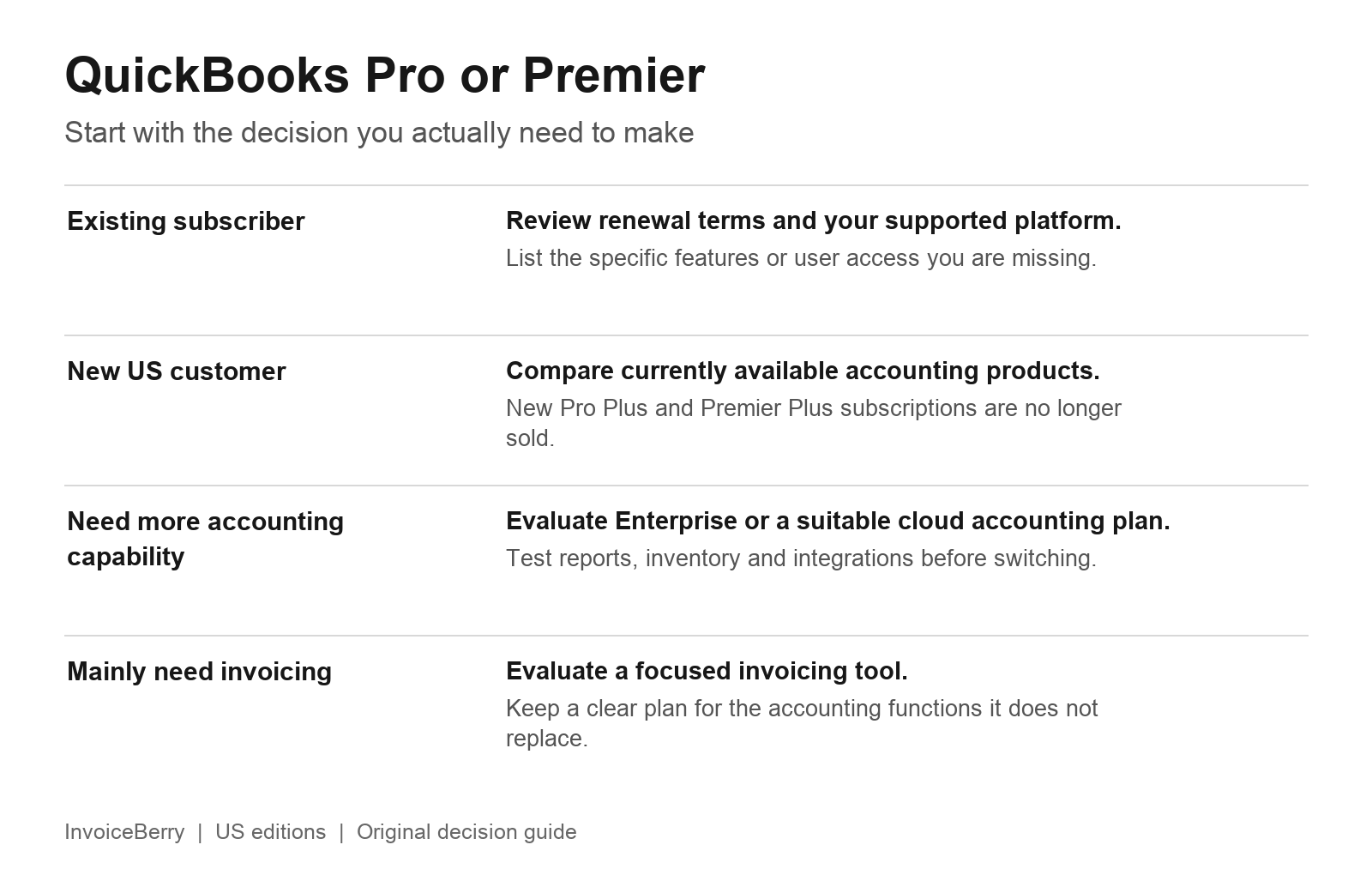
Start with your subscription status, then list the work your next system must support.
If you already use Pro Plus or Premier Plus
Start with a renewal review. Compare the amount quoted for your account with the cost and disruption of changing systems. Confirm your supported platform, required seats, payroll or payment services, integrations and backup arrangements. A familiar system that meets your needs can be a reasonable choice while you evaluate alternatives.
If you need a different edition or additional seats, ask Intuit to confirm the options available for your existing subscription. Renewal eligibility is not proof that every edition change or new license purchase is available.
Avoid comparing an old advertised starting price with today’s renewal quote. To compare costs fairly, include required users, add-ons, hosting if needed, implementation work and the time your team will spend learning a new system.
If you are a new customer
Pro Plus and Premier Plus are no longer new-subscription choices in the US. QuickBooks Desktop Enterprise remains available, and QuickBooks Online is a separate cloud accounting option. The right choice depends on your workflows and the current plan’s features, not which product name sounds closest to Premier.
Enterprise is worth evaluating when you need a desktop accounting system with more capacity or advanced operational features. Intuit’s Pro and Premier to Enterprise comparison describes its broader user capacity, permissions, reporting and inventory options. Some capabilities depend on the subscription tier.
QuickBooks Online is worth evaluating when browser access and collaboration are central requirements. It is not simply Premier running in a browser. Test the reports, inventory workflows and connected services you rely on before moving a live business file. Start with Intuit’s current product comparison rather than an old plan chart.
If you are looking beyond Intuit, our guide to QuickBooks alternatives introduces other accounting and invoicing tools to put on your shortlist. Check each provider’s current features and prices against your requirements.
If your main need is sending invoices
A full accounting package may cover much more than your everyday billing work. If you mainly need to create invoices, track payments and record expenses, consider whether a focused invoicing tool fits alongside the bookkeeping process you already use.
InvoiceBerry provides online invoicing, payment tracking and expense tracking for small businesses and freelancers. It is not a like-for-like replacement for QuickBooks’ general ledger, payroll, inventory assemblies or industry-specific accounting workflows. Agree with your bookkeeper how information will reach your accounting records before making a change.
You can explore InvoiceBerry’s invoicing approach for Desktop users if billing is the part of your process you want to simplify.
A practical checklist before changing software
- List the tasks you use each week, then identify the ones that currently require a workaround. Include invoices, bills, payroll, stock, sales orders and reporting where relevant.
- Save a backup and export the reports and records you need to retain. Confirm that you can open the backup and that your team knows how to access historical information.
- Test representative transactions in the proposed system. Include a normal invoice and any less common workflows that matter, such as a partial shipment, credit note or assembly.
- Compare opening balances, unpaid invoices, outstanding bills and key reports with your bookkeeper before switching live work. Do not assume every historical field or integration will transfer unchanged.
- Plan the cutover and ongoing responsibilities. Decide who checks imports, trains staff, handles recurring work and monitors the first reporting period.
The useful question is whether your current edition supports the way your business works. For existing subscribers, that means reviewing renewal terms and specific gaps. For new US customers, it means comparing products that are actually available. For businesses that primarily need billing tools, it means separating invoicing needs from the accounting functions that still need a home.
Small Business Finance 101
Download our free guide to learn the fundamentals of finance that will help make your small business more efficient and successful.